Alternative Approaches to Mobile Device Security


Last updated 9 September 2026
Mobile devices carry corporate email, messaging, authentication tokens and increasingly the AI tools employees use to get work done. Protecting them is now standard practice. Choosing how to protect them is where organisations differ, because the market offers four different options and they are not variations on a theme.
Each approach places inspection somewhere different. That single design decision determines what a product can detect, what it costs the person holding the phone, and which jurisdiction employee data ends up in.
The stakes have risen sharply. AI has made phishing lures cheap to produce, fluent in any language and fresh enough that reputation-based blocking arrives too late. At the same time, employees are moving customer data, contract terms and internal material through AI assistants on devices many security teams have no visibility into.
Anyone weighing the alternatives to mobile device security as it was first deployed is really choosing between architectures. The four alternative approaches to mobile device security below run from device management alone to on-device inspection, and each carries its own trade-offs.
The question every mobile security product has to answer
Strip away the marketing and every product in this market answers one question: where does inspection happen?
The answer determines what the product can see, what it does to the device and the person holding it, and where employee data ends up. Everything else follows from it. Feature lists tend to converge. Architectures do not.

1. MDM or UEM on its own
Mobile device management handles enrolment, configuration, policy enforcement, app distribution and remote wipe. Intune, Jamf, Workspace ONE and MaaS360 all do this well, and every mobile security programme needs it.
What MDM does not do is detect an attack. It reports the state of a device: which OS version it runs, whether it is enrolled, whether required apps are present. Apple and Google deliberately limit what a management profile can observe, and none of that visibility extends to the content arriving on the device. A fully compliant, fully patched, fully managed phone will still open a malicious link.
Treating MDM as a security control is the most common gap we encounter. It is the foundation a programme sits on rather than the protection itself.
2. Device-signal MTD
The first generation of mobile threat defence products built on the MDM signal set. They catalogue OS version, jailbreak or root status, app inventory, requested permissions, certificate configuration and the networks a device joins, then pass a risk verdict back to the MDM so conditional access can be applied.
This was a genuine advance, and device posture remains worth monitoring. The limits are structural:
- Platform restrictions cap what any app can read about another app or the file system, so detection depends on inference from a narrow signal set.
- The dominant mobile threat arrives as a malicious link rather than a malicious app, reaching employees through SMS, WhatsApp, Messenger, QR codes and in-app messages. Corrata’s own research puts 85% of mobile phishing outside email entirely. None of it registers in a device posture scan.
- Verdicts require an analyst to interpret, which favours organisations with a staffed security team.
- MDM integration is a hard dependency, which lengthens deployment.
Most vendors in this bracket have since added link protection. How they added it is the subject of the next two sections, and it is the part worth asking about.
3. Cloud or gateway-based inspection
The most common way to add traffic inspection is to move the traffic. These products install a VPN profile or tunnel and route device traffic to a cloud proxy, where inspection happens centrally.
It is a reasonable engineering choice. Central inspection allows heavy analysis, shared threat intelligence across the customer base and consistent policy. But routing traffic off the device carries consequences that buyers often discover after deployment:
- All traffic transits vendor infrastructure, including personal browsing on a device the employee owns. This is the point at which works councils and privacy officers tend to get involved.
- Availability becomes a dependency. If the gateway is unreachable, you choose between failing open, which removes protection, and failing closed, which removes connectivity. Neither is comfortable at scale.
- Latency and battery cost are real, and they drive users to disable the profile.
- Data residency questions follow the traffic. Where inspection happens determines which jurisdiction employee data sits in.
If you evaluate a product in this category, the availability question is the one to press hardest, because it is the failure mode that surfaces on the worst possible day.
4. On-device deep packet inspection
The fourth approach inspects traffic where it is generated. Nothing is relayed. The device examines its own network traffic locally and acts on what it finds.
This is Corrata’s architecture, and it produces a different set of properties:
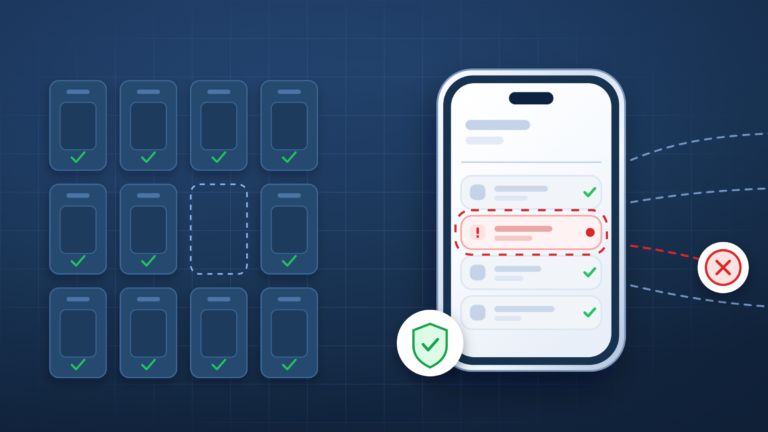
- Visibility of the channels that matter: Because inspection sits at the network layer on the device, a malicious link is caught regardless of which app delivered it. SMS, messaging platforms, QR codes and browsers are all covered by the same control.
- Prevention rather than reporting: Connections to malicious hosts are blocked as they are attempted, and malware already installed on a device is disabled by blocking communications with its command and control servers.
- Encryption quality is checked in flight: Certificate metadata is examined so that weakly protected connections, eavesdropping on Wi-Fi and man-in-the-middle attempts are caught.
- Personal traffic stays on the device: Browsing history is processed locally, and only security-critical information is sent to the cloud, which makes the privacy conversation with employees a much shorter one.
- MDM is optional: Deployment works with or without it, which shortens rollout considerably.
Six questions to ask any vendor
Whichever direction you go, these separate architectures faster than a feature matrix:
- Where is traffic inspected, on the device or in your cloud?
- What happens to protection if your infrastructure is unavailable?
- Does protection cover links delivered outside email, and how?
- Is MDM integration required or optional?
- What employee data leaves the device, and in which jurisdiction is it stored?
- Can you show me which AI applications are in use on a given device?
For a vendor-by-vendor view of how the main products answer these, our guide to mobile threat defence software works through roughly ten solutions and where each one lands.
Frequently Asked Questions
No. Mobile device management enforces configuration and policy, and it reports the state of a device. It does not inspect the content arriving on that device, so it cannot detect or block a phishing link, and Apple and Google restrict what any management profile is permitted to observe. MDM is the foundation a mobile security programme sits on rather than the protection itself.
Mobile threat defense, usually shortened to MTD, looks for threats against a device, while MDM manages the device itself. The first generation of MTD products worked from device signals such as OS version, jailbreak status and app inventory, and passed a risk verdict back to the MDM. Later products added traffic inspection, and where that inspection happens is the main architectural difference between vendors today.
Outside email. Malicious links reach employees through SMS, WhatsApp, Messenger, QR codes and in-app messages, none of which appear in a device posture scan. Corrata’s research puts 85% of mobile phishing outside email entirely.
It depends where inspection happens. If traffic is routed to a vendor cloud, all of it goes there, personal browsing included. With on-device inspection, browsing history is processed locally and only security-critical information is sent to the cloud.