

Applied for a job through Indeed, and now are waiting for an interview call? No worries, just download this app and attend the interview.
This is the new tactic that is employed by attackers.
Recruitment scams have always been around but now with the difficulty rising in the job market and job hunt, many people would do anything that would lead them closer into landing a job. This new scam is employed by malicious actors, where they mimic the Indeed job platform. The victims often are reached out to by the bad actors in the form of SMS messages, asking them to download an app called IndeedInterview to attend the interview or schedule it for a later date.
Once installed on the device, the malware works to steal the credentials of your accounts. Even if the app is not installed on the device, just the mere act of clicking on the link is enough to let the bad actors know that this device / user / number is prone to clicking any links that come through the SMS. This campaign was active in the Middle East, but there are chances that they are employing these tactics in different regions of the world.
It is particularly targeted at mobile devices, since if a person were to access the website on their desktop it would navigate or prompt them to open the website on their phone.
The application is not active at the moment, however the domain that was used in this campaign is still active. It has not changed the way it operates, however we have observed on certain networks that it does change the way it operates.
When the website is accessed on the desktop, it displays a QR code, asking the user to scan the code which opens the phishing website on the device, and in some cases it displays a fake job listing for a remote job in Canada with an option to email the “recruiters” with information about the CV.


Following this, it is likely that they would ask the users to download an application attached with the email or scan a QR code which will lead the user to a page where they can download the malware onto the device.
We performed our own investigation into this based on the report from MalwareBytes.
Workflow of the attack
Date tested: Sep 25, 2026
Devices used: Samsung A15, Samsung Galaxy Z Flip
Android version: Android 16


Below is a screen recording of the workflow.
Technical Details
There were many interesting things that were found through deeper investigation of this malware. Like any malware of recent times, it installs an innocuous file, following which a dropper is installed on the device. This is the main malicious payload that causes harm.
The malware APK is completely obfuscated with an encryption making it difficult for it to be analysed through traditional tools like Android Studio. When we accessed the link, we were able to download multiple files of the malware. Each version of the malware that was downloaded onto the device, had a different hash value, different package name, and in some cases, even the icon colour of the malware was different.
The attackers made use of an interesting technique called server side polymorphism. This means that whenever a victim tries to download malware onto the device, the code is rearranged internally on the server side, as well as changes the package name of the malware.
This is used to evade detection as multiple services traditionally check for the SHA256 Hash values and packages name, which are not changed. This is also why Play Protect and many third party vendors were able to detect only one version of the malware when it was reported.
At the time of our investigation, Play Protect was not able to detect the presence of the different versions of the malware.
On the analysis of the APK file, we were also able to find the various possible package names as well as function names, to avoid easy analysis, and identification of each function present in the code. The malware asks for extensive permissions along with accessibility services permission. However this accessibility permission is specifically for the Dropper.
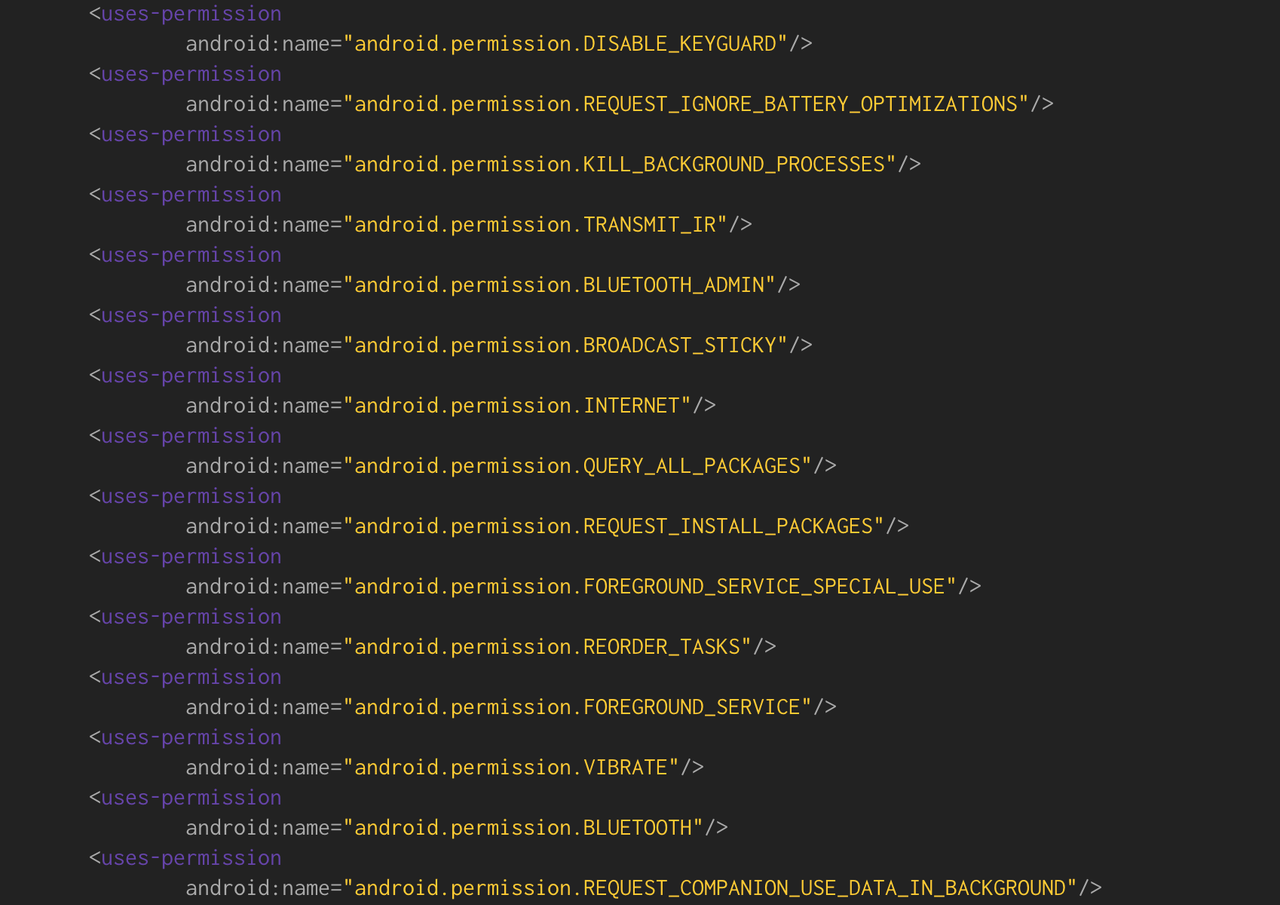
Although the functionality of the malware is the same, which behaves like a spyware and exfiltrates the data from the device, the permissions that each version of the malware APK require is different. This is possibly done to evade detection as much as possible, as it would change the file size and hash value significantly.
An XML file called deviceStreaming.xml was found to have a list of devices, manufactures and models. The purpose of this file is that when a particular model / device is detected then the data exfiltration can happen. This potentially leads us to believe that this piece of malicious software has spyware capabilities.
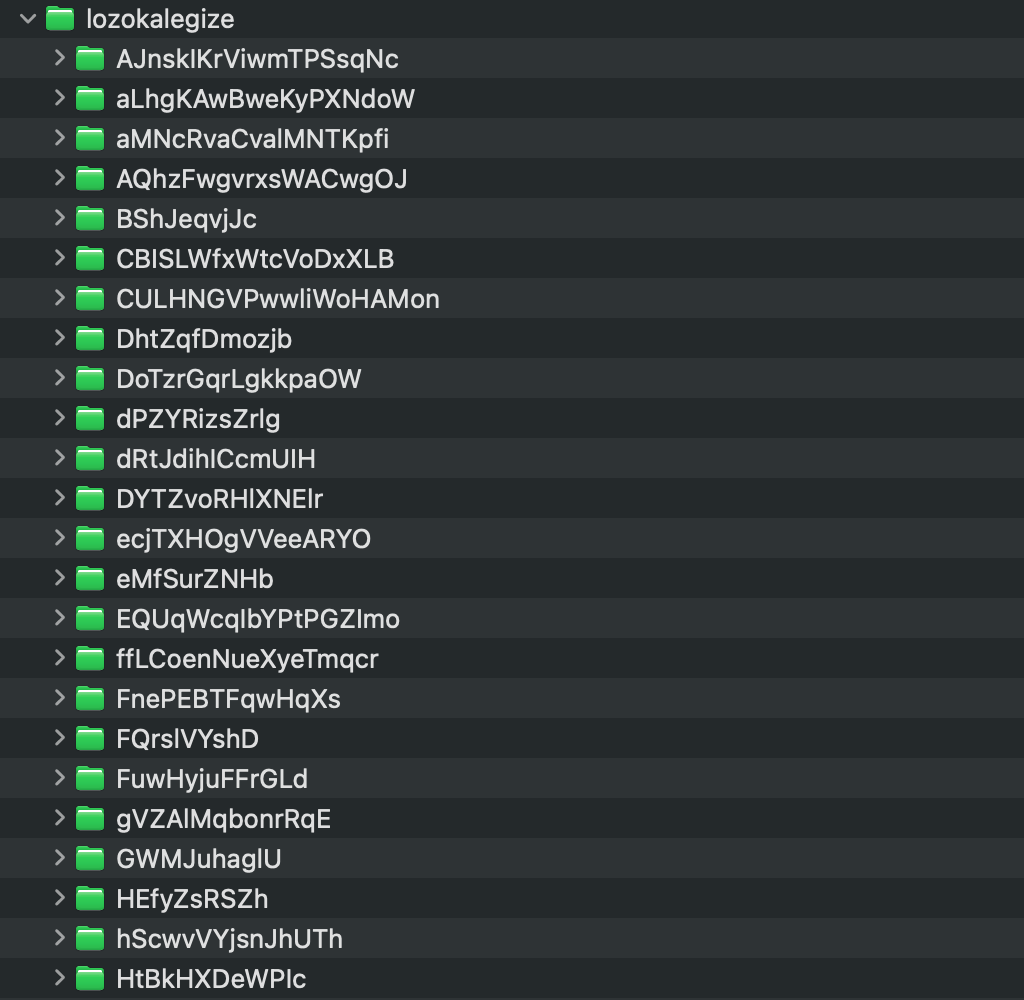
We were also able to detect the possible versions of the package names and functions that could be employed by the malware. This was identified as they were not being in any location inside the file or calling any function. An extensive list of words consisting of jumbled up letters was found. For each version of the malware that was downloaded the list of words changes.

When the innocuous looking file is installed on the device, it asks you to log in, set up a VPN connection, and then update the app. The reason for the VPN connection is that all the traffic goes through the attackers VPN service with nothing to interfere with it.
The dropper named “Updater” is then installed on the device. We observed that if dropper is not installed correctly or not given the necessary permissions, it is incredibly persistent. With unnecessary notifications as well as the vibrate effect on the device, it would annoy the victim into granting the permissions it is asking for. Both the devices that we completed the tests on were part of the list.
Once this act is done, the phone performs a temporary update, and all the permissions are granted to the malware. This will be completely hidden from the main screen and it can be seen only in the Settings under Apps. It is very difficult to remove, for if you try to access the application, it immediately closes the screens.
The malware is also quite clever, if it detects an emulator, the innocuous app completely crashes and does not run on the device.
How to spot and avoid fake interview apps
- Whenever you have to install an app for an interview, double check if it is from a legitimate source such as Play Store, and confirm that the person who sent it to you is legitimate company.
- We have noticed an increase in malwares asking for VPN connection, to evade detection and sending data safely to the C2 servers.
- Applications downloaded from any source asking for accessibility permission should be proceeded with caution.
Indicators of Compromise
- Startcareer[.]org
- Api[.]flowerscantdie[.]com
- Drive-interview[.]cloud
- Api[.]interviewtoday[.]info
Currently all these domains are active, and should be dealt with caution.
About Corrata
Corrata provides mobile threat defence for iOS and Android, including protection against apps that over-reach on permissions or come from outside the official stores.
See how Corrata approaches spyware detection on employee devices.


